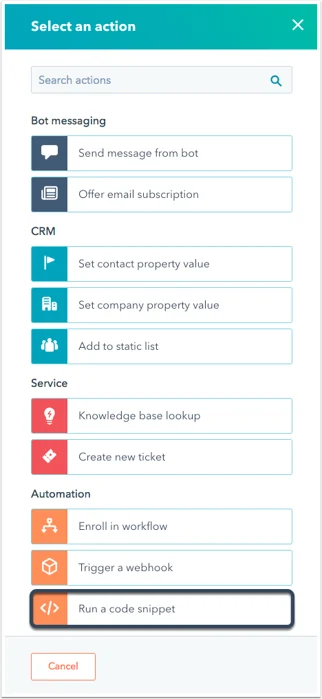
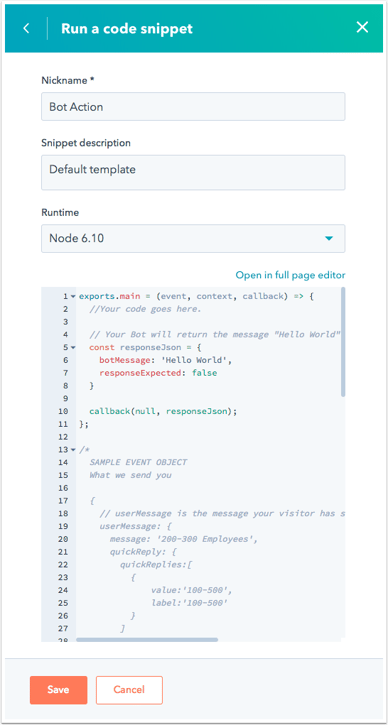
Geben Sie Ihrer Aktion dann einen Namen. Im Code-Bearbeitungsfenster sehen Sie die Standardvorlage für Node.js 10.x. Die Details des „event“-Objekts und die möglichen Antwortobjektformate sind nachfolgend beschrieben.
Der Code wird ausgelöst, wenn die gespeicherte Aktion in einer Unterhaltung erreicht ist.Bei der Arbeit mit Code-Snippets sollten drei Aspekte berücksichtigt werden:
Die Funktion exports.main() wird aufgerufen, wenn die Code-Snippet-Aktion ausgeführt wird.
Das event-Argument ist ein Objekt, das Details für den Besucher und die Chat-Sitzung enthält.
Die callback()-Funktion wird verwendet, um Daten zurück an den Bot und den Benutzer zu übergeben. Sie sollte in der exports.main-Funktion aufgerufen werden.
Das event-Objekt enthält die folgenden Daten:
Falschen Code melden
Kopieren
KI fragen
//example payload{ "userMessage": { // Details for the last message sent to your bot "message": "100-500", // The last message received by your bot, sent by the visitor "quickReply": { // If the visitor selected any quick reply options, this will be a list of the selected options. // Will be 'null' if no options were selected. "quickReplies":[ // A list of quick reply options selected by the visitor { "value":"100-500", "label":"100-500" } ], }, "session": { "vid": 12345, // The contact VID of the visitor, if known. "properties": { // A list of properties collected by the bot in the current session. "CONTACT": { "firstname": { "value": "John", "syncedAt": 1534362540592 }, "email": { "value": "[email protected]", "syncedAt": 1534362541764 }, "lastname": { "value": "Smith", "syncedAt": 1534362540592 } } }, "customState":{myCustomCounter: 1, myCustomString:"someString"} // Only present if it customState was passed in from a previous callback payload }}
Die callback()-Funktion wird verwendet, um Daten zurück an den Bot zu senden. Das Argument sollte ein Objekt mit den folgenden Daten sein:
Falschen Code melden
Kopieren
KI fragen
//sample payload{ "botMessage": "Thanks for checking out our website!", // This is the message your bot will display to the visitor. "quickReplies": [{ value:'option', // Passed to the bot as the response on click label:'Option' // Gets displayed as the button label }], // the quickReplies object is optional "nextModuleNickname": "SuggestAwesomeProduct", // The nickname of the next module the bot should execute. If undefined, the bot will follow the default configured behavior "responseExpected": false // If true, the bot will display the returned botMessage, wait for a response, then execute this code snippet again with that new response. "customState":{myCustomCounter: 1, myCustomString:"someString"} // Optional field to pass along to the next step.}
Die Ausführung von Code-Snippets in Bots muss innerhalb von 20 Sekunden abgeschlossen sein. Sie dürfen nur 128 MB Speicherplatz verbrauchen. Ein Überschreiten einer dieser Beschränkungen führt zu einem Fehler.